AI Agents — Dark Factory
The Dark Factory turns FastMCP from a passive tool server into an autonomous agent platform. Define agents and tasks as sub-components in the Stacktic UI. Tasks run on a schedule, call AI with MCP tools, and report results via email or webhook — zero human intervention.
Architecture
FastMCP Pod
├── server.py              (MCP server — auto-discovers tools)
├── tools/*.py             (MCP tools: databases, kubectl, prometheus, etc.)
├── dark_factory.py        (Autonomous loop + 6 MCP tools)
└── ENV: DARK_FACTORY_*    (Agent + task configs from sub-components)
Flow per task:
Schedule (cron) → Select tools → Build prompt → AI loop → Notify → Store history
                                      ↑                      │
                                      └──── tool call ────────┘
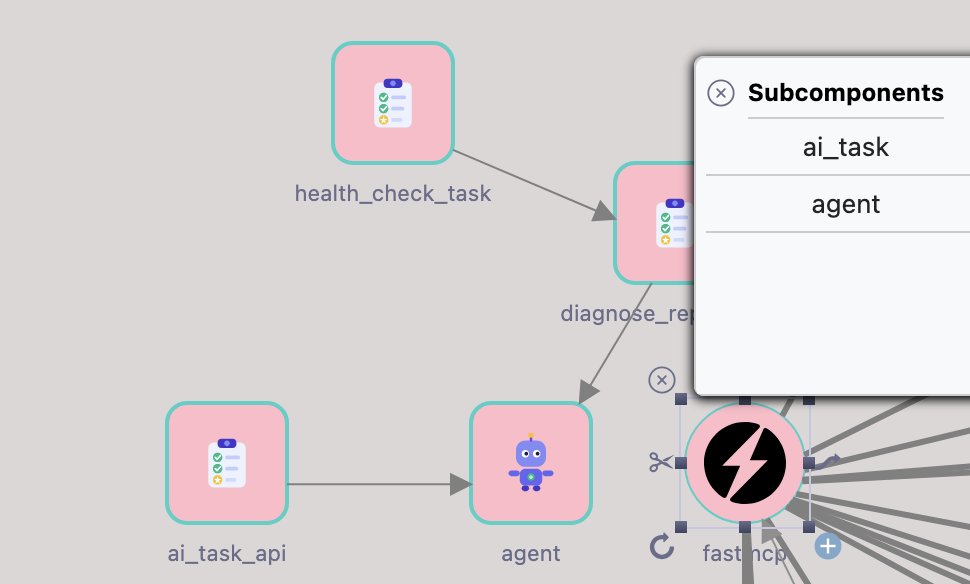
Sub-Components
Two sub-component types on the FastMCP component:
| Type | Purpose | Example |
|---|---|---|
| agent | AI model configuration — who does the work | anthropic + claude-sonnet-4-20250514 + API key |
| ai_task | Task definition — what to do, when, how | "Check pods for CPU > 80%" + cron */15 * * * * |
Sub-Component Links
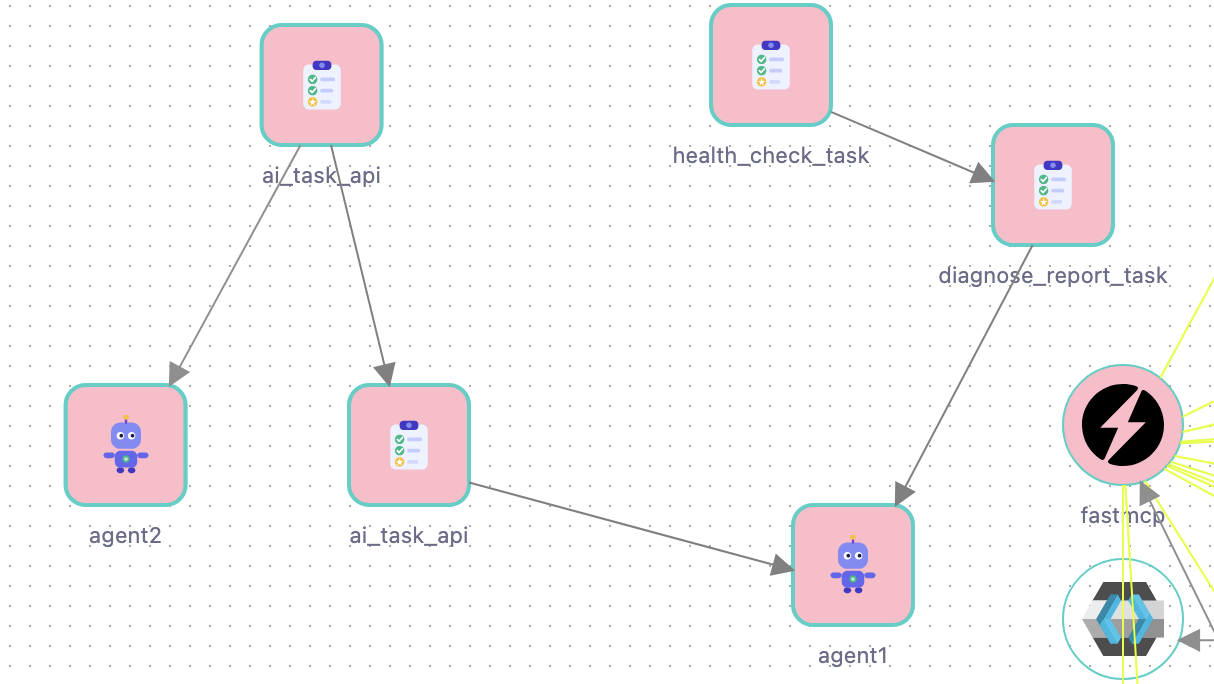
| Link Type | From → To | Purpose |
|---|---|---|
ai_task-agent | ai_task → agent | Which AI runs the task. Each task can target a different agent. |
ai_task-ai_task | ai_task → ai_task | Task chaining. On success, triggers next task with previous output as context. |
Agent Fallback
If a task has no ai_task-agent link, it automatically uses the first available agent. In single-agent setups, you don't need to link every task — the fallback handles it.
This is useful for:
- Quick setups where all tasks use the same model
- Chain tasks where only the first task has an explicit agent link
Agent Attributes
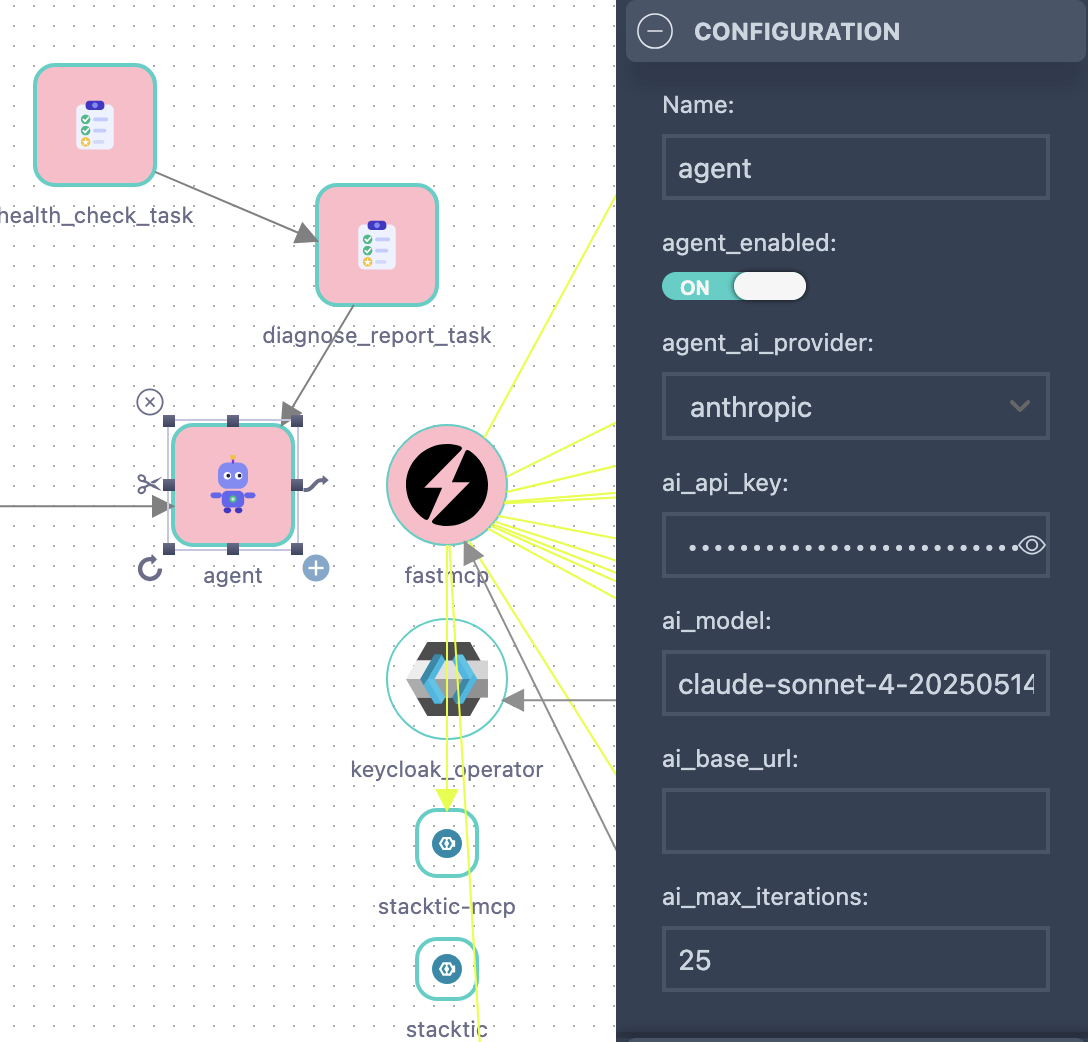
| Attribute | Default | Description |
|---|---|---|
ai_api_key | (required) | API key for the AI provider |
ai_model | claude-haiku-4-5-20251001 | Model ID. Haiku = cheap + fast. Sonnet = smarter for complex tasks. |
agent_ai_provider | anthropic | anthropic or openai-compatible (vLLM, Ollama) |
ai_base_url | — | Custom API base URL (for OpenAI-compatible providers) |
ai_max_iterations | 10 | Max tool-use loop iterations per run |
agent_enabled | true | Master switch. false = all linked tasks stop. Survives pod restarts. |
Task Attributes
| Attribute | Default | Description |
|---|---|---|
task_description | (required) | Natural language instruction. Write it like you'd tell a human operator. |
cron_expression | — | Cron schedule (5-field). Empty = run once on pod start. |
agent_mode | monitor | monitor = read-only tools (safe). act = read + write tools. |
retry_count | 0 | How many retries on failure |
retry_delay_seconds | 60 | Seconds between retries |
notify_webhook | — | Webhook URL for notifications (Slack, Teams, PagerDuty) |
notify_email | — | Email address for HTML result reports |
Cron Schedule
Standard 5-field cron expression:
| Expression | Meaning |
|---|---|
*/5 * * * * | Every 5 minutes (urgent monitoring) |
*/30 * * * * | Every 30 minutes (standard monitoring) |
0 9 * * 1-5 | Weekdays at 9am UTC (daily report) |
0 */6 * * * | Every 6 hours |
0 0 * * 0 | Sunday midnight (weekly review) |
0 0 1 * * | First day of month (monthly compliance) |
| (empty) | Run once on pod start, then never again |
Task Chaining
Link tasks via ai_task-ai_task to create pipelines. Each task in the chain can use a different agent.
health-check (cron: */15 * * * *)  ──→  diagnose-report (no cron)  ──→  remediate (no cron)
  agent: haiku (cheap/fast)                agent: sonnet (smart)           agent: sonnet
  mode: monitor                            mode: monitor                   mode: act
Rules:
- Only the first task needs a
cron_expression— chained tasks trigger automatically on success - Each task can use a different agent (cost optimization: cheap for data gathering, smart for analysis)
- Chain stops if a task fails (unless
retry_count > 0) - Chained tasks receive the previous task's full output as context
Example Chain
Task 1: health-check — cron */15 * * * *, agent: haiku, mode: monitor
Check all pods across namespaces for: CPU > 80%, memory > 90%, restart count > 3 in last hour, or CrashLoopBackOff status. Report affected pods with namespace, resource usage, and restart count.
Task 2: diagnose-report — no cron (chain), agent: sonnet, mode: monitor
For each unhealthy pod from the previous check: query logs for error patterns, check recent deployments in that namespace, and check if related services have alerts firing. Summarize root cause per pod and send the report to the webhook.
Tool Selection
Each task only gets the MCP tools relevant to its description — not all 150+ tools. Selection is local keyword matching (zero extra API calls):
| Keywords in description | Tools selected |
|---|---|
| prometheus, metric, alert, cpu, memory | prom_* |
| postgresql, postgres, sql, database | pg_*, cnpg_* |
| mongodb, mongo, collection | mongo_* |
| clickhouse, olap, analytics | ch_* |
| kafka, topic, consumer, producer | kafka_* |
| rabbitmq, rabbit, amqp, queue | rmq_* |
| loki, log, logs, logging | loki_* |
| pod, deploy, namespace, kubectl | kubectl_* |
| s3, bucket, minio, seaweedfs | s3_* |
| valkey, redis, cache | valkey_* |
| topology, stack_agent, test | query_topology, run_test |
If no keywords match, all tools are available (safety net).
agent_mode filter: In monitor mode, write-capable tools (INSERT, DELETE, publish, scale) are excluded regardless of keyword match.
Notifications
Email
Set on the FastMCP component (shared across all tasks):
| Attribute | Description |
|---|---|
email_provider | smtp or http (for Resend, Mailgun, SendGrid) |
email_from | Sender email address |
smtp_host / smtp_port | SMTP server (when provider=smtp) |
smtp_user / smtp_password | SMTP credentials |
email_http_api_key | API key (when provider=http) |
email_http_url | HTTP email endpoint (default: https://api.resend.com/emails) |
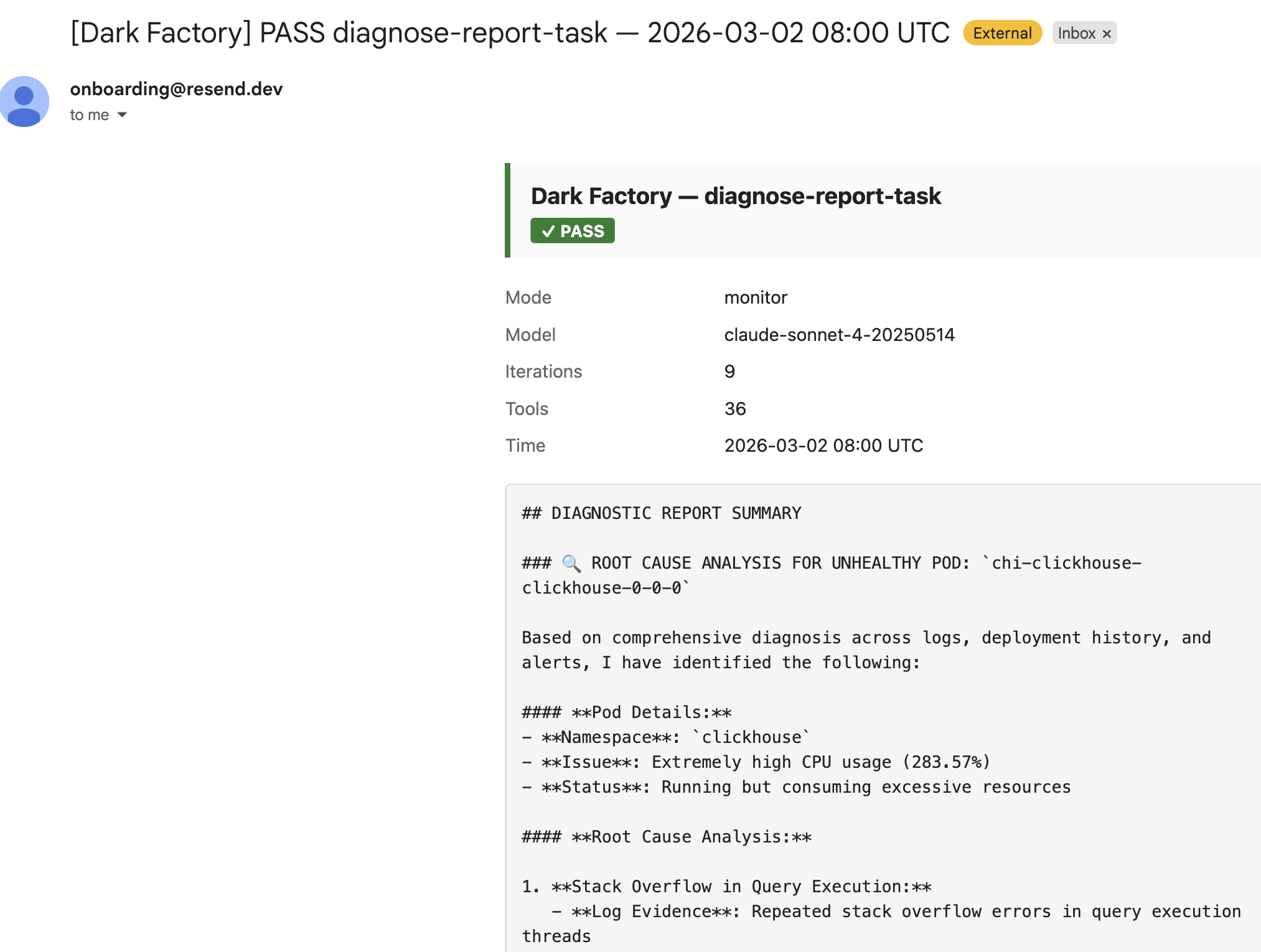
Each task's notify_email attribute controls who gets the report. Email includes a styled HTML report with status badge, metadata table, and full output.
Webhook
Set notify_webhook on each task (or notify_webhook on the component for a global default). JSON payload:
{
  "task": "health-check",
  "status": "success",
  "summary": "All pods healthy. No CPU/memory violations found.",
  "timestamp": "2026-03-02T08:00:00Z"
}
Includes a text field for Slack compatibility.
MCP Tools
When agents/tasks exist, dark_factory.py registers 6 tools for managing the autonomous loop from any MCP client:
| Tool | Description |
|---|---|
dark_factory_status | Status of all agents and tasks — enabled, cron, last run, cost |
dark_factory_history(task_name, limit) | Execution history (default: last 10 runs) |
dark_factory_toggle_agent(name, enabled) | Enable/disable agent at runtime (resets on restart) |
dark_factory_run_now(task_name, follow_chain) | Trigger immediate execution, optionally follow chain |
dark_factory_cost | Per-task token usage and estimated USD cost |
Enable / Disable
| Method | How | Persists? | When to use |
|---|---|---|---|
| Permanent | Set agent_enabled=false on agent sub-component. Regenerate + apply. | Yes | Long-term disable, maintenance |
| Runtime | Call dark_factory_toggle_agent("name", false) from MCP client | No (resets on restart) | Quick pause, debugging |
Setup Guide
1. Create an agent sub-component
On your FastMCP component, add a sub-component of type agent:
- Set
ai_api_key(Anthropic API key) - Set
ai_model(e.g.claude-sonnet-4-20250514) - Set
agent_enabledtotrue
2. Create task sub-components
Add sub-components of type ai_task:
- Write a clear
task_descriptionin natural language - Set
cron_expressionfor scheduled tasks (or leave empty for run-once) - Set
agent_modetomonitor(safe) oract(can write) - Optionally set
notify_emailornotify_webhook
3. Link tasks to agents
Draw an ai_task-agent link from each task to the agent that should run it. Or skip this step — tasks without a link automatically use the first agent.
4. Chain tasks (optional)
Draw ai_task-ai_task links to create pipelines. Only the first task needs a cron schedule.
5. Configure notifications (optional)
On the FastMCP component, set email provider attributes (email_provider, email_from, etc.) if you want email reports.
6. Generate and deploy
# Stacktic generates the stack
# Then apply:
kubectl apply -k k8s/deploy/overlays/dev/fastmcp/
The Dark Factory starts automatically on pod startup. Check logs:
kubectl logs -l stacktic.io/app=fastmcp -n fastmcp | grep dark_factory
Cost Optimization
- Use Haiku for simple monitoring tasks (cheap, fast)
- Use Sonnet only for tasks requiring complex reasoning
- Chain cheap agents (data gathering) with smart agents (analysis)
- Set
ai_max_iterationslower for simple tasks (5-10) and higher for complex ones (20-25) - Use
cron_expressionwisely —*/5 * * * *costs 12x more than0 * * * * - Call
dark_factory_costMCP tool to monitor token usage
Example Configurations
Single task — pod health monitoring
agent: haiku, ai_max_iterations: 10
task:  "Check all pods for CPU > 80% or restart count > 3"
       cron: */30 * * * *, mode: monitor, email: ops@company.com
Chain — detect and diagnose
agent-fast: haiku, ai_max_iterations: 10
agent-smart: sonnet, ai_max_iterations: 25

task-1: "Check Prometheus for anomalies in CPU, memory, and error rates"
        cron: */15 * * * *, mode: monitor
        link: task-1 → agent-fast (ai_task-agent)
        link: task-1 → task-2 (ai_task-ai_task)

task-2: "Analyze the anomalies found. Query logs, check deployments. Root cause report."
        mode: monitor, email: team@company.com
        link: task-2 → agent-smart (ai_task-agent)
Weekly compliance audit
agent: sonnet, ai_max_iterations: 25
task:  "Check OPA compliance for all namespaces. Report violations grouped by severity."
       cron: 0 9 * * 1, mode: monitor, retry_count: 2, email: security@company.com